

Introduction
Shipping new code feels fast until a live system breaks at peak traffic. Teams often rush to launch features before checking backups, alerts, or resource limits. A broken release can slow down users, wake engineers at night, and hurt trust.
Modern cloud systems have many moving parts. Containers, pipelines, cloud accounts, and security tools all need to work together. Without clear steps, teams guess what to fix next.
This guide explains how teams build safer and steadier systems. You will learn how to check release readiness, grow delivery skills, and run Kubernetes with care. It also covers platform teams, reliability goals, incident response, security checks, system visibility, and cloud spending. Using clear roadmaps from OpsRoadmaps helps teams plan steady progress without extra noise.
What Is Production Readiness
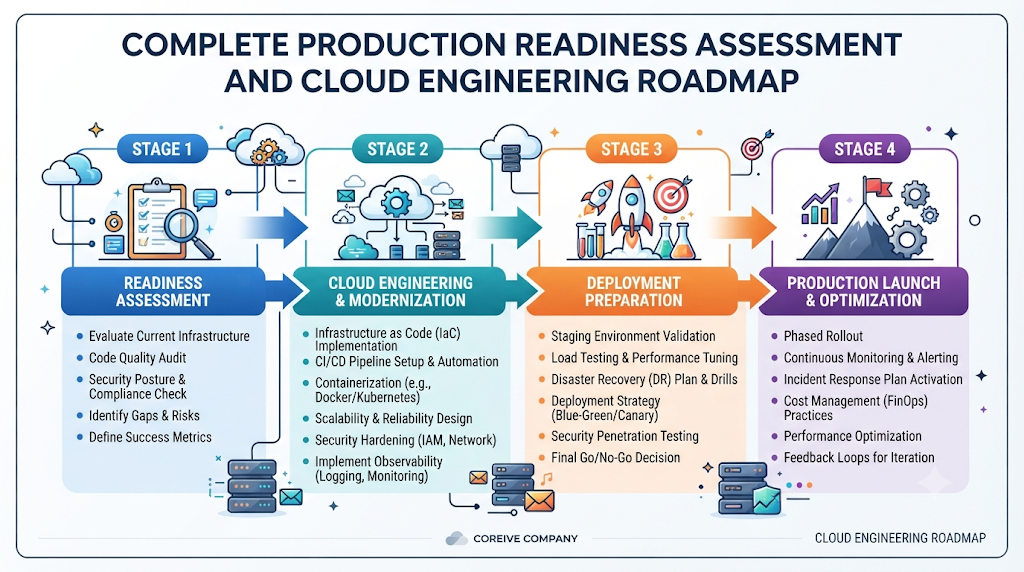
Production readiness assessment checks if a service can handle real users safely. It asks a simple question before launch. Can the team run and fix this system when things go wrong?
A good check looks at code health, server capacity, and access rules. It also checks backups, logs, alerts, and recovery plans. Teams review these items before a release goes live.
Why Readiness Is an Ongoing Habit
Systems change every week as teams add features and fix bugs. A check done once last month does not fit today’s code. Teams should treat readiness as a regular habit, not a one-time gate.
Even a careful check cannot promise a bug-free launch. Still, it catches blind spots early. Fixing a missing alert or weak backup before launch saves hours of stress later.
Common Gaps Teams Miss Before Launch
Teams often test happy paths and skip failure tests. They may launch without a clear rollback plan or a tested restore. Missing runbooks also slow down engineers during a live issue.
Teams can close these gaps with small, clear tasks. Write down who owns each alert and how to restart a failed service. Keep checklists short so engineers actually use them.
How to Run a DevOps Maturity Assessment
A DevOps maturity assessment shows how well teams build, test, and ship software. It looks at habits, tools, and teamwork across the delivery chain. Leaders use it to see where work gets stuck.
Basic teams often rely on manual steps and slow handoffs. Developing teams automate builds, tests, and basic deployments. Advanced teams use strong automation, fast feedback, and steady release habits.
Key Areas in Delivery Maturity
Good delivery starts with clean source control and small code changes. Automated builds and tests catch errors before code reaches users. Infrastructure as Code keeps servers and networks consistent across environments.
Strong feedback loops matter just as much as speed. Teams watch release health, fix root causes, and improve their process. Shared goals help developers and operations work as one group.
Turning Assessment Findings Into Action
An assessment is only useful if it leads to clear next steps. Pick one or two bottlenecks instead of changing everything at once. For example, fix flaky tests before adding more deployment steps.
Review progress every few months as habits grow. Adjust goals when team size or product needs shift. OpsRoadmaps helps teams frame these growth steps in plain order.
| Practice Area | Early Habit | Stronger Habit |
|---|---|---|
| Code and Builds | Manual steps and large merges | Small pull requests and fast builds |
| Environments | Hand-built servers and drift | Versioned templates and repeatable setups |
| Testing | Late manual checks | Fast automated checks on every change |
| Releases | Rare and stressful events | Routine and reversible rollouts |
Kubernetes Production Readiness and Troubleshooting
Running containers at scale brings real power and real complexity. A Kubernetes production readiness checklist helps teams set up clusters and workloads safely. It keeps small mistakes from taking down whole apps.
Core Settings for Production Clusters
Set CPU and memory requests and limits on every container. Requests help the scheduler place pods well, while limits stop one noisy app from starving others. Always add liveness and readiness probes so Kubernetes knows when a pod is healthy.
Plan for growth and failure across zones. Use multiple replicas, pod disruption budgets, and network policies to limit blast radius. Store secrets safely, back up stateful data, and test restores often.
Kubernetes CrashLoopBackOff Troubleshooting
Seeing a pod stuck in CrashLoopBackOff means Kubernetes keeps restarting a failing container. It waits longer between retries after repeated crashes. Blindly restarting pods does not fix the root cause.
Common causes include app startup bugs, bad commands, or missing environment variables. Wrong config files, out-of-memory kills, or failing health checks also trigger restarts. Check the facts before changing any cluster settings.
Practical Steps to Find the Root Cause
Start with basic status checks to see which pod is failing. Run kubectl get pods to spot restart counts and pod names. Next, run kubectl describe pod to read recent events and exit codes.
Read the container output to see what the app said before crashing. Use kubectl logs for current output or kubectl logs --previous for the last crashed container. Finally, check kubectl get events across the namespace for wider clues.
Look for clear clues like an out-of-memory exit code or a missing config key. Fix the code, config, or resource limit based on what you find. Then redeploy and watch the pod stay healthy.
Platform Engineering Adoption Roadmap
Many developers spend too much time wiring up pipelines and cloud templates. A platform engineering adoption roadmap helps teams build shared tools that cut that friction. The goal is simple self-service with safe guardrails.
Start With Real Developer Needs
Talk to developers before building any internal portal or tool. Find repeated tasks that slow down daily work, like spinning up a new service. Good platform work solves real pain instead of adding extra layers.
Keep the first version small and useful. Offer clean templates, CI/CD links, and basic service catalogs that teams want to use. Collect feedback often and refine features based on real usage.
Balance Speed With Guardrails
A platform works best when teams choose it because it saves time. Bake security rules, tags, and logging into templates by default. That way, developers get safe setups without manual tickets.
Not every company needs a large internal platform right away. Small teams may only need a few solid scripts and shared pipelines. Grow the platform only when shared needs justify the effort.
SRE Adoption Roadmap
Site Reliability Engineering brings clear numbers to system health. An SRE adoption roadmap helps teams balance new features with steady uptime. Instead of guessing if a service is reliable, teams measure it.
Set Clear Service Goals
Start by picking a few critical user journeys, like checkout or login. Define Service Level Indicators to measure what users actually feel, such as request success or speed. Then set Service Level Objectives as realistic targets for those indicators.
Service Level Agreements set external promises with customers, often tied to business terms. Error budgets show how much unreliability a service can tolerate over time. When error budget runs low, teams can pause risky changes and focus on stability.
Cut Toil and Learn From Incidents
Manual, repetitive tasks that do not add lasting value are called toil. Automating routine checks and restarts frees engineers for deeper work. Regular reliability reviews keep goals aligned with traffic growth.
When incidents happen, run blameless post-incident reviews. Focus on system fixes rather than blaming people. OpsRoadmaps outlines how teams can step through reliability habits at a steady pace.
Incident Management Maturity Model
Outages will still happen even in well-run systems. An incident management maturity model shows how smoothly a team detects, handles, and learns from them. Moving up in maturity cuts confusion when pressure is high.
From Noisy Alerts to Clear Roles
Early teams often drown in noisy alerts and ad-hoc group chats. Mature teams tune alerts to real user impact and route them to clear owners. Defined severity levels help everyone judge urgency fast.
During an incident, one person can lead response while others check logs or update status. Clear escalation paths bring in experts when needed. Short, regular status updates keep leaders and users informed.
Closing the Loop After Recovery
Fixing the live problem is only half of incident work. Write a clear timeline and root cause summary while details are fresh. Assign concrete follow-up tasks with owners and due dates.
Share lessons across teams so others avoid the same trap. Track whether follow-up fixes actually get finished. Calm habits turn stressful outages into lessons that make systems stronger.
| Stage | Alerting and Response | Learning Loop |
|---|---|---|
| Reactive | Noisy alerts, unclear roles, slow handoffs | Quick patches, little or no follow-up |
| Structured | Severity tiers, named leads, basic runbooks | Written reviews and tracked action items |
| Proactive | Signal-focused alerts, practiced drills | Trend reviews and systemic prevention |
DevSecOps Implementation Roadmap
Security works better when teams check it early instead of bolting it on at the end. A DevSecOps implementation roadmap weaves security checks into daily coding and releases. It treats security as a shared habit across engineering.
Add Checks Into Daily Workflows
Start by listing your biggest risks, such as exposed keys or old libraries. Add code scans, dependency checks, secret scans, and container checks into CI/CD pipelines. Keep rules clear so developers get fast, helpful fixes.
Lock down cloud access with least privilege and enforce policy checks on infrastructure code. Track vulnerabilities by risk so teams fix high-impact issues first. Good tools help, but human habits and clear ownership keep systems safe.
Share Responsibility Without Slowing Delivery
Developers know their code best, and security engineers know threat patterns best. Working together helps teams fix issues faster without blame. Start with a few high-value checks and expand as teams adapt.
Remember that automated scans cannot catch every flaw or logic bug. Combine tool checks with code reviews, patch habits, and clear access rules. Steady security habits protect users without grinding releases to a halt.
Observability Maturity Model
Monitoring tells you when a metric crosses a line, while observability helps you ask why. An observability maturity model guides teams from basic checks to deeper system insight. Good visibility cuts guesswork during tricky bugs.
Metrics, Logs, and Traces Together
Metrics track numbers over time, like CPU use, error rates, and request counts. Logs record detailed events from apps and servers when something happens. Traces follow a single request across services to show where time is spent.
Centralize logs and traces so engineers can search them in one place. Build clean dashboards around real user flows instead of cluttering screens with dozens of charts. More graphs do not help if nobody can read them during an outage.
Move From Guesswork to Fast Answers
Basic setups often show a spike without showing which service caused it. Connected metrics, logs, and traces help engineers trace slow calls quickly. User experience checks also show how real devices see your app.
Improve observability step by step on your busiest services first. Add context like request IDs so logs and traces link together. Clear signals help teams spot trouble early and fix it with confidence.
Cloud Cost Optimization Roadmap
Cloud bills can grow quietly as teams spin up test clusters, snapshots, and extra nodes. A cloud cost optimization roadmap helps teams trim waste while keeping speed and uptime intact. Smart spending is part of good engineering.
Spot Waste and Right-Size Resources
Start by reviewing current spend and tagging resources by team, app, and environment. Look for idle servers, unattached disks, old snapshots, and chatty cross-zone traffic. Right-size instances and containers to match actual load rather than guesses.
Use autoscaling to match capacity with traffic patterns. Schedule non-production environments to sleep outside work hours when safe. Consider committed capacity only for steady workloads with clear usage history.
Keep Reliability and Security in Balance
Never cut costs by removing backups, lowering replica counts blindly, or weakening security. Set budget alerts so teams see spending shifts before month-end surprises. Review costs on a regular schedule alongside performance metrics.
Small cleanup tasks add up over time across cloud accounts. Track changes after each tweak to confirm performance stays steady. Teams can pair cost habits with roadmaps from OpsRoadmaps to keep spending aligned with growth.
Turning Assessments Into Practical Roadmaps
Assessments show where you stand today, and roadmaps show how to move forward. Start by listing your top risks across reliability, delivery, security, and cloud spend. Pick a few high-impact items that fit your team’s current bandwidth.
Assign clear owners and realistic dates to each item. Avoid rolling out every new tool or framework at once. Introduce one change, measure the result, and adjust your plan as you learn.
Connect your work across areas so fixes support each other. Better observability makes incident response faster, and cleaner deployments make readiness easier. A flexible roadmap keeps your team moving forward without burning out.
Frequently Asked Questions
What is a production readiness assessment? It is a review of whether a service is safe and supportable for live users. Teams check stability, backups, alerts, security, and recovery steps before release.
How does a DevOps maturity assessment help engineering teams? It shows how well source control, testing, automation, and teamwork support fast, safe releases. Teams use the findings to pick practical next steps.
What belongs on a Kubernetes production readiness checklist? It includes resource requests and limits, health probes, multiple replicas, and network policies. Teams also check secrets, backups, logging, and access controls.
How do you start Kubernetes CrashLoopBackOff troubleshooting? Check pod status and recent events first, then read current and previous container logs. Use those clues to fix bad configs, code errors, or resource limits before redeploying.
How should a team begin a platform engineering adoption roadmap? Start by reviewing developer pain points and repeated setup tasks. Build a small, helpful self-service foundation with clear templates and gather feedback.
What is the main goal of an SRE adoption roadmap? It helps teams set clear reliability targets using SLIs, SLOs, and error budgets. Teams pair those goals with automation and blameless reviews to keep services steady.
How does an incident management maturity model improve outages? It moves teams from noisy alerts and unclear roles to structured response and learning. Clear severity levels, ownership, and follow-ups reduce confusion during incidents.
How do you build a DevSecOps implementation roadmap? Introduce code, dependency, secret, and container checks into CI/CD workflows early. Pair automated checks with access controls and shared team ownership.
What does an observability maturity model focus on? It focuses on using metrics, logs, and traces together to understand system behavior. Good visibility helps teams find root causes faster without relying on noisy dashboards.
How can teams follow a cloud cost optimization roadmap safely? Review spend, tag resources, remove idle assets, and right-size workloads to match real demand. Set budget alerts and check performance so savings never hurt reliability.
Conclusion
Building reliable cloud systems takes steady habits rather than quick fixes. Checking readiness, growing delivery maturity, and running Kubernetes with care protect users every day. Clear platform tools, reliability targets, incident habits, security checks, deep visibility, and smart cloud spending all support one goal.
Start small, measure what changes, and keep improving at a pace your team can sustain. Structured guides from OpsRoadmaps can help you organize each step along the way. With clear priorities and consistent follow-through, your team can ship faster with greater confidence.