

Introduction
Finding court updates can feel hard. Many people look at online court records for the first time and feel lost. Legal words can sound very confusing. Online portals help you check court information. You can track a case from your home phone or computer. This guide shows you simple steps to check court cases. It also helps you understand common case words and official updates.
What Is Court Case Status?
Court case status means the recorded progress of a lawsuit. It shows the current stage of a legal matter from day to day. Available details can include the next hearing date. They can also show past court orders or the final result.
Different courts may show different levels of detail online. Understanding this status helps you stay prepared for any upcoming court actions. It lets you know if the judge needs more documents or if the court set a new date for arguments.
Where to Check Court Case Status in India
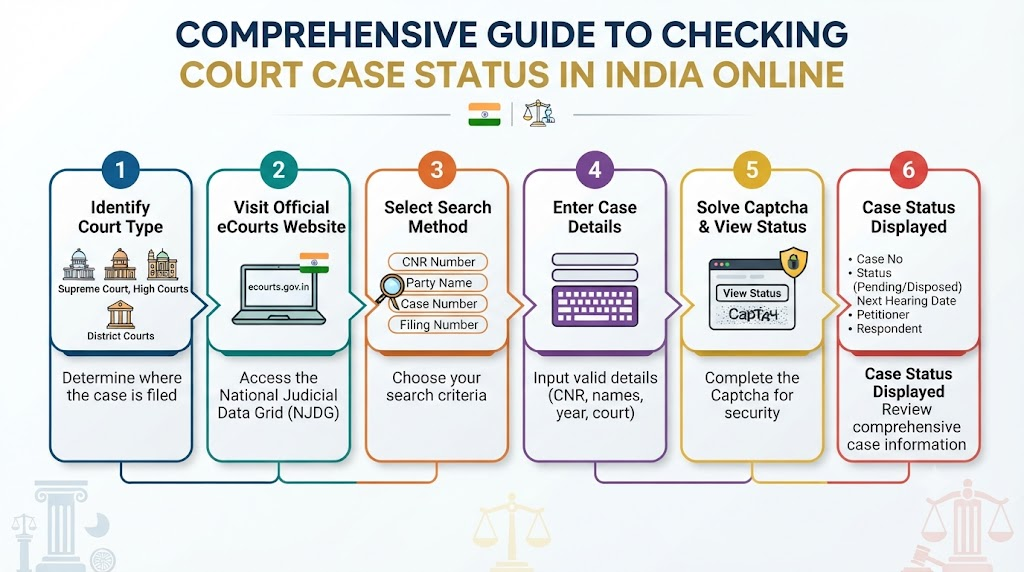
India uses digital portals for different court levels. You must pick the right website for your specific case.
eCourts Services for District Courts
The official eCourts Services portal covers most district courts across India. You can use the official eCourts Services portal to look up local records. This portal links hundreds of district courts in one place.
High Court Websites
Some cases belong in a state High Court. You must visit the specific High Court portal for those matters. Always pick the correct state bench because each state runs its own high court system.
Supreme Court Website
You should use the official Supreme Court website for top court matters. Each court tier uses its own system for case tracking. Knowing the correct court tier stops you from searching the wrong website.
How to Check Court Case Status by CNR Number
A CNR number makes online searches very fast. Follow these simple steps to find your record.
Step 1: Find the CNR Number
A CNR means Case Number Record. It is a unique 16-character code for supported court records. Check your court papers or ask your lawyer if you cannot find it. Every new case gets this code right when the court registers it.
Step 2: Open the Official Portal
Open the verified official eCourts portal in your web browser. Make sure you use the correct official link to protect your device from fake sites.
Step 3: Enter the CNR Number
Type your 16-digit code into the search box. Do not use spaces or hyphens between the letters and numbers. A clean entry helps the system find the right file instantly.
Step 4: Complete the Search
Click the search button on the screen. The portal will open the matching case record for you in a few seconds.
Step 5: Read the Case Details
Look at the screen to see the status and case history. Available data fields can vary by district and state. Check the petitioner name, respondent name, and police station details to confirm it is your file.
How to Check Case Status Without a CNR Number
You can still search when you do not have a CNR code. Court portals offer other useful search options.
Search by Case Number
You can select your case type, enter the case number, and pick the filing year. This helps the system find your exact file among thousands of records.
Search by Party Name
You can type a petitioner or respondent name into the search field. Common names can produce many results, so check other details carefully to find the correct match.
Search by Advocate Name
Some portals let you search using a lawyer’s name. This helps you find cases handled by a specific legal advocate across different courts.
Search by Filing Number
You can also use the original filing number if your portal supports it. Always use the search fields available on your selected court page to get the best results.
Common Court Case Status Terms Explained
| Status Term | Simple Meaning | What the Reader Should Check |
| Pending | The case is still active in court. | Check the next scheduled hearing date. |
| Listed for Hearing | The case appears on the daily cause list. | Confirm if the court will hear the matter today. |
| Next Hearing Date | The court set a future date for the case. | Note the date and prepare for the next step. |
| Adjourned | The court postponed the hearing to a new date. | Look for the newly assigned date on the portal. |
| Disposed | The court concluded the case proceedings. | Read the final judgment or closing order. |
| Judgment Delivered | The judge announced the final decision. | Obtain a certified copy of the final judgment. |
| Order Passed | The court issued a direction on a motion. | Read the full order text for specific instructions. |
| Notice Issued | The court sent formal notice to the other party. | Check if service of notice is complete. |
| Awaiting Orders | The court waits to issue a ruling or update. | Check back after the next scheduled working day. |
These terms can vary by court and case type. A listed date does not prove the hearing took place. Always check the latest case history or order for real clarity.
How to Read the Next Hearing Date
The next hearing date tells you when the court meets next. Note the date, court room number, and case number carefully.
Dates can change due to unexpected court schedule updates or judge availability. Confirm important dates with your lawyer or local court office. Online dates may not reflect last-minute changes right away. Staying in touch with your advocate prevents you from missing a surprise schedule change.
How to Read Case History and Court Orders
Case history records past events in a chronological timeline from start to finish. Court orders explain what happened during past hearings and what the judge directed.
Short status labels only give a basic summary. Read the full text of an order when the exact words matter for your next move. Never guess what an order means without looking at its full context. Certified copies from the court clerk give you the exact legal language you need.
What to Do When Case Status Does Not Update
Missing or old information can happen for several reasons. The court staff might still need time to type and upload the daily updates.
Check your CNR or case number for typing errors. Visit the relevant court website again later in the day. Contact your lawyer or the court office if information stays missing for a long time. A delayed update does not always mean a problem with your case.
Common Mistakes to Avoid
People often make simple errors when checking court records online. Avoid entering the wrong case number or choosing the wrong court location.
Do not confuse similar party names on the search results page. Avoid relying on old screenshots because case details change daily. Never assume that a “disposed” label explains the full outcome without reading the order. Confirm important facts with official records to stay safe.
How WakilSahab Can Help Readers Find Legal Guidance
Finding legal information can feel stressful for anyone. Platforms like WakilSahab provide helpful resources for everyday citizens.
You can explore legal articles and discussion features on WakilSahab to learn more about court procedures and terminology. You can also use lawyer search tools to connect with qualified professionals in your area. WakilSahab does not operate official court databases or replace certified court records. It simply helps you explore legal topics and find suitable legal support.
Frequently Asked Questions
How can I check court case status online in India?
You can use the official eCourts Services portal or relevant High Court websites. Enter your CNR number or case details to view the latest status and history.
Can I check a court case without a CNR number?
Yes, you can search by case number, party name, or advocate name. Select the search option that matches the details you have on your papers.
What does a pending case mean?
A pending case means the court has not finished hearing the matter. The lawsuit remains active and awaits future court dates for arguments or evidence.
Where can I find the next hearing date?
You can find the next hearing date on the case history page of the official court portal. Always confirm this date directly with your lawyer.
What should I do if my case status looks wrong?
Check your search numbers for typing errors and try refreshing the portal. Contact your lawyer or court clerk if the record needs clear verification.
What is a CNR number in Indian courts?
A CNR number is a unique 16-character code assigned to every registered case. It helps you find court records instantly on digital portals without extra steps.
Is the online court status legally binding?
Online case status updates are for quick reference only. They do not replace certified physical copies of court orders issued by the registry.
Why is my case status not showing up online?
The court staff might still need time to upload the data after a hearing. Check your numbers again or ask your lawyer for guidance.
Can I check Supreme Court cases on the eCourts portal?
No, Supreme Court cases have a separate portal. You must visit the official Supreme Court website for those specific records and updates.
What does a “disposed” case status mean?
A disposed status means the court resolved or closed the matter. Read the final judgment document to know the exact legal outcome.
How often do court websites update their data?
Portals update after daily court proceedings end and staff enter the notes. Delays can happen if the court staff faces a heavy workload.
How can WakilSahab help me with my legal case?
WakilSahab lets you read legal guides and find qualified advocates. It helps you understand your choices before you take formal legal action.
Conclusion
Checking court case status online helps you stay informed about legal matters from anywhere. Use official court websites and enter your details carefully to avoid mistakes. Read the latest case history and complete orders to understand your next steps. Always consult your lawyer for advice that fits your specific situation and rights. You can also explore legal guides and lawyer search tools on WakilSahab when you need extra guidance and support.